
Download Elyoum – Free Islamic Calendar for Mac, Menu Bar App, Hijri Dates & Sunnah Alerts
Overview
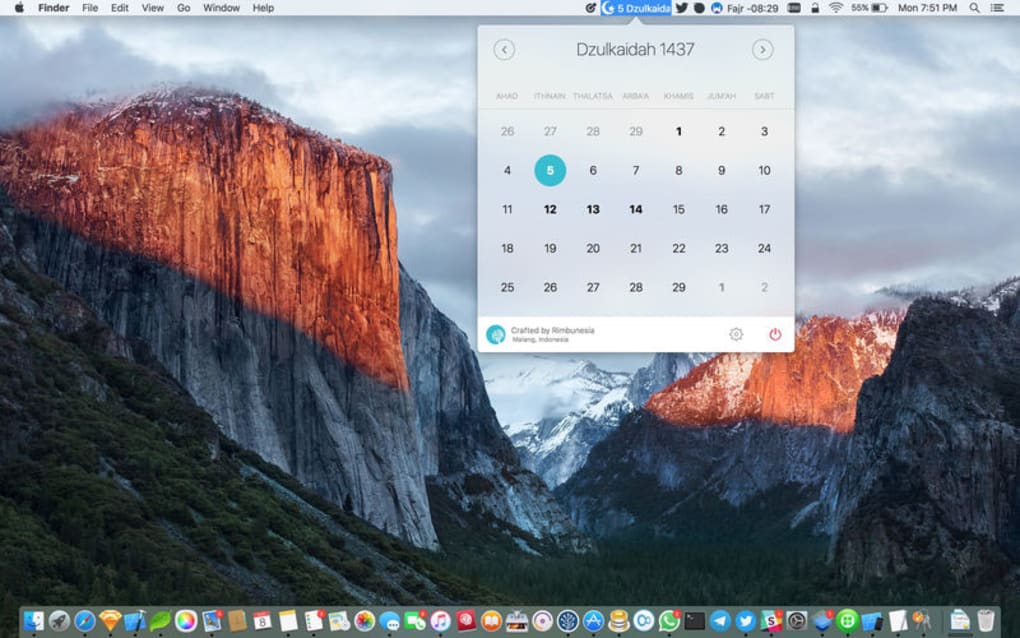
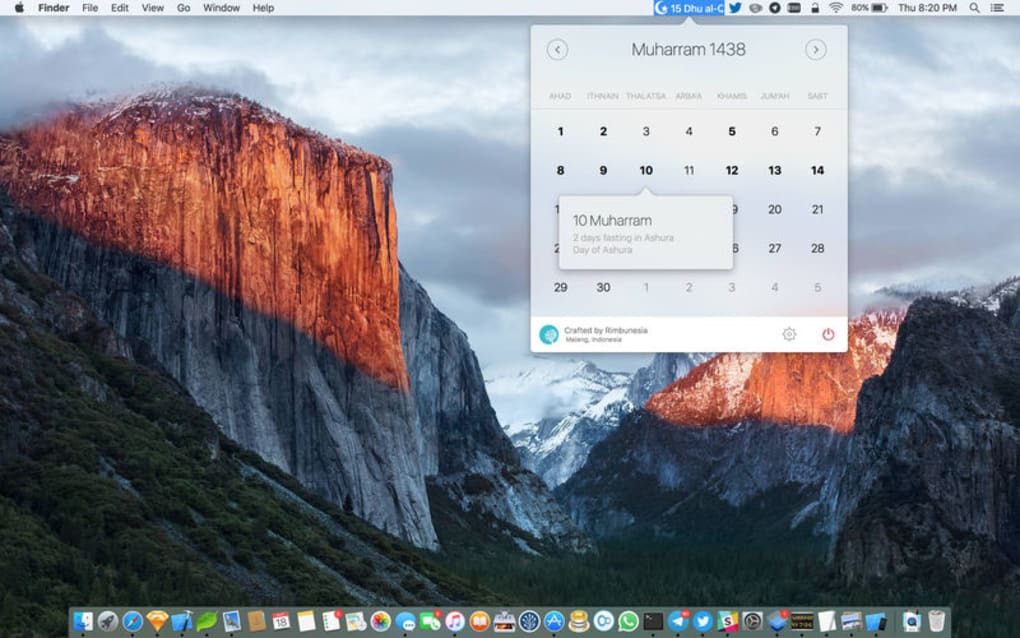
Elyoum is a lightweight, menu‑bar Islamic calendar designed specifically for macOS users who want instant access to Hijri dates, Sunnah fasting reminders, and historic Islamic events. Unlike bulky desktop programs, Elyoum lives quietly in the menu bar, showing today’s Gregorian and Hijri dates at a glance. A single click reveals a dropdown with the full month, key religious observances, and a brief description of each day’s significance. The app is free to download, with optional in‑app purchases that let you tailor the date format, shorten month names, or add custom notifications. For Muslims who rely on the lunar calendar for daily prayers, Ramadan fasting, and other rites, Elyoum removes the guesswork of calculating moon phases and offers a secure, always‑up‑to‑date source of information directly on their Mac.
Beyond simply displaying dates, Elyoum integrates the traditional Islamic calendar’s nuances—such as the 29‑ or 30‑day month cycle and the 30‑year leap‑year pattern that adjusts the final month, Dhu al‑Hijjah. The app automatically syncs with an online Hijri database, ensuring that the calendar stays aligned with astronomical observations without requiring manual adjustments. Users also benefit from push notifications that alert them a day before important Sunnah fasts, giving them ample time to prepare spiritually and logistically. Whether you’re a student, professional, or family member looking to keep your household on schedule, Elyoum’s unobtrusive design and reliable data make it a valuable daily companion.
Key Features of Elyoum
- Real‑time Hijri and Gregorian date display in the macOS menu bar.
- Automatic calculation of lunar months (29/30 days) and 30‑year leap‑year cycle.
- Daily Sunnah fasting reminders with one‑day‑ahead notifications.
- Historical Islamic events for each Hijri date, including notable figures and milestones.
- Customizable date format and optional short month names via in‑app purchase.
- Lightweight footprint – under 5 MB, no background daemons.
- Secure, offline‑first design; no personal data is collected or transmitted.
- Free core functionality with optional premium upgrades.
Each feature is crafted to address a specific need of the modern Muslim user on macOS. The real‑time date display eliminates the need to open a separate calendar app; a glance at the menu bar tells you both the Gregorian and Hijri dates, which is essential for scheduling prayers, work meetings, or school assignments that follow the Gregorian calendar. The automatic lunar calculation removes the cumbersome task of manually tracking moon sightings, while the built‑in 30‑year cycle guarantees that Dhu al‑Hijjah’s length is always correct.
The Sunnah fasting reminders are particularly useful during the months of Sha‘ban and Ramadan, when voluntary fasts are encouraged. Elyoum sends a subtle macOS notification the evening before, allowing users to plan meals and adjust sleep schedules. Historical event listings enrich daily life by connecting users with the broader tapestry of Islamic heritage—perfect for educators, parents, or anyone who enjoys learning about the past while living in the present.
Customization options via in‑app purchase let power users choose a concise month abbreviation (e.g., “Ram” instead of “Ramadan”) or switch the order of Gregorian/Hijri dates to match personal preferences. This flexibility, combined with the app’s minimal system impact, makes Elyoum a seamless addition to any Mac workflow.
Installation, Usage & Compatibility
Getting Elyoum up and running on your Mac takes just a few minutes. Follow the steps below for a smooth installation:
- Visit the official Elyoum website or the Mac App Store and click the “Download” button.
- Once the
.dmgfile finishes downloading, double‑click it to open the installer. - Drag the Elyoum icon into your Applications folder as instructed.
- Launch the app from the Applications folder or via Spotlight. The first time you open it, macOS may ask you to confirm that you trust the developer—click “Open”.
- Elyoum will automatically add an icon to your menu bar. Click the icon to expand the dropdown calendar view.
- Open Preferences from the dropdown to enable notifications, select your preferred date format, and, if desired, purchase premium customizations.
After installation, using Elyoum is intuitive. The menu‑bar icon shows today’s Gregorian date on the left and the Hijri date on the right. Clicking the icon reveals a compact monthly view where you can scroll through months with the mouse wheel or arrow keys. Days with significant Islamic events are highlighted in a subtle shade, and hovering over a highlighted date displays a tooltip with a brief description.
Compatibility – Elyoum is built for macOS 10.14 (Mojave) and later, including Ventura, Sonoma, and future releases. The app is optimized for both Intel‑based Macs and Apple Silicon (M1/M2) devices, leveraging universal binaries to ensure smooth performance on all hardware configurations.
If you encounter any issues during installation—such as the app not appearing in the menu bar—try restarting your Mac or checking System Settings → Security & Privacy to confirm that Elyoum has permission to run. The developer provides a support email and a knowledge‑base FAQ (see the section below) for troubleshooting common problems like notification not firing or date sync errors.
Pros, Cons, Frequently Asked Questions & Final Thoughts
Pros
- Free core functionality with no intrusive ads.
- Accurate Hijri date calculations based on up‑to‑date lunar data.
- Lightweight and stays out of the way in the menu bar.
- Instant notifications for Sunnah fasts.
- Historical event insights add educational value.
- Supports both Intel and Apple Silicon Macs.
Cons
- Customization options require a paid upgrade.
- No Android or iOS companion app (macOS‑only).
- Limited to English language interface (future multilingual support planned).
Frequently Asked Questions
Is Elyoum completely free?
The core calendar, date display, and fasting notifications are free. Optional in‑app purchases unlock custom date formats and shortened month names.
How does Elyoum stay accurate with lunar months?
Elyoum syncs with a reliable online Hijri database that updates monthly based on astronomical observations, automatically handling the 29‑/30‑day cycle and the 30‑year leap‑year adjustment.
Can I receive notifications for all Islamic holidays?
Yes. In addition to Sunnah fasting alerts, Elyoum can notify you of major holidays like Eid al‑Fitr, Eid al‑Adha, and the start of Ramadan. You can enable or disable each notification type in Preferences.
Does Elyoum collect any personal data?
No. The app works offline after the initial date sync and does not store or transmit personal information. All notifications are generated locally on your Mac.
Will Elyoum work on older macOS versions like High Sierra?
The minimum supported version is macOS 10.14 (Mojave). Users on High Sierra (10.13) or earlier will need to upgrade their operating system to run Elyoum.
Conclusion & Call to Action
Elyoum fills a niche that many macOS users have long needed—a clean, reliable Islamic calendar that lives in the menu bar without demanding attention. Its free core features, accurate lunar calculations, and helpful fasting notifications make it an indispensable tool for anyone who follows the Hijri calendar daily. While the optional premium tweaks could be more expansive, they are priced modestly and do not affect the essential functionality. If you’re looking for a secure, low‑impact way to keep track of Islamic dates and historic events right from your Mac, Elyoum is the answer. Download Elyoum today, enable the notifications, and let the app keep you spiritually aligned without interrupting your workflow.







